
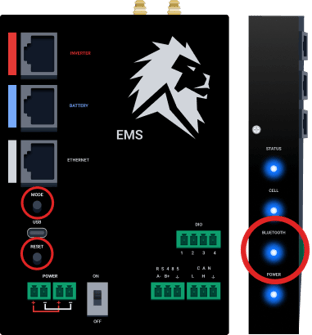
 EMS-C
EMS-C
The EMS-C has two buttons:
-
Mode: Switches between local Bluetooth connection and Wi-Fi
-
Reset: Reboots the EMS-C
When the Bluetooth light is solid, the EMS-C is paired to a cell phone or laptop.
Bluetooth communication is used to troubleshoot or commission a Sanctuary. The EMS-C is generally connected to Wi-Fi to upload data.
EMS-C LED Indicators

- No Lights = Power is off
- Blinking Yellow = Connecting
- Solid Yellow = EMS-C or Inverter Updating
- Blinking Blue = Uploading or downloading data
- Solid Blue = Connected
- Solid Red = Disconnected (or EMS-C has faulted)
Cellular Indicator
- No Lights = Cellular is off
- Blinking Light = Connecting
- Solid Light = Connected
Bluetooth Indicator
- No Lights = Cellular is off
- Blinking Light = Broadcasting Signal
- Solid Light = Bluetooth paired (Cell phone or Laptop)
Power Indicator
- No Lights = Power is off
- Lights On = Power is on